> For clean Markdown of any page, append .md to the page URL.
> For a complete documentation index, see https://developers.brevo.com/llms.txt.
> For AI client integration (Claude Code, Cursor, etc.), connect to the MCP server at https://developers.brevo.com/_mcp/server.
## What API wrappers and libraries does Brevo officially support?
Brevo officially supports the following API libraries:
1. PHP: [https://github.com/brevo/APIv3-php-library](https://github.com/sendinblue/APIv3-php-library)
2. Node.js: [https://github.com/brevo/APIv3-nodejs-library](https://github.com/sendinblue/APIv3-nodejs-library)
3. TypeScript: [https://github.com/brevo/APIv3-typescript-library](https://github.com/sendinblue/APIv3-typescript-library)
4. Ruby: [https://github.com/brevo/APIv3-ruby-library](https://github.com/sendinblue/APIv3-ruby-library)
5. Python: [https://github.com/brevo/APIv3-python-library](https://github.com/sendinblue/APIv3-python-library)
6. Java: [https://github.com/brevo/APIv3-java-library](https://github.com/sendinblue/APIv3-java-library)
7. C#: [https://github.com/brevo/APIv3-csharp-library](https://github.com/sendinblue/APIv3-csharp-library)
8. Go: [https://github.com/brevo/APIv3-go-library](https://github.com/sendinblue/APIv3-go-library)
For more information about our repositories, see [this link](https://github.com/sendinblue?utf8=%E2%9C%93\&q=APIV3+library\&type=\&language=).
\
\
## What is the date format accepted by Brevo API?
For the date attribute, the Brevo API accepts dates only in `yyyy-mm-dd` format and displays them according to the client's dashboard/portal setting.
**For example** (DOB is a date type attribute):
```json
"DOB": "2021-05-29"
```
\
\
## What is the correct file body format when importing contacts to a list?
```json
"fileBody": "EMAIL;FIRSTNAME;LASTNAME;SMS\nexample1@brevo.com;Mike;Doe;91XXXXXXXXXX\nexample2@brevo.com;John;Smith;91XXXXXXXXXX"
```
**Note**: `\\n` separates contacts.
\
\
## How does pagination work in the Brevo API?
Some endpoints return a limited number of records per request.
**For example:** Get all your transactional email activity (unaggregated events) returns only 100 records per call.
These endpoints support an `offset` parameter (the starting point in the list) to fetch all records.
**For example:**
1. `limit=100&offset=0` returns the first 100 events (1-100).
2. `limit=100&offset=100` returns the next 100 events (101-200).
3. `limit=100&offset=200` returns events 201-300.
4. `limit=100&offset=300` returns events 301-400.
Increase the offset value to fetch more records.
\
\
## **DOI (Double-opt-in) template**
## How to create a DOI template?
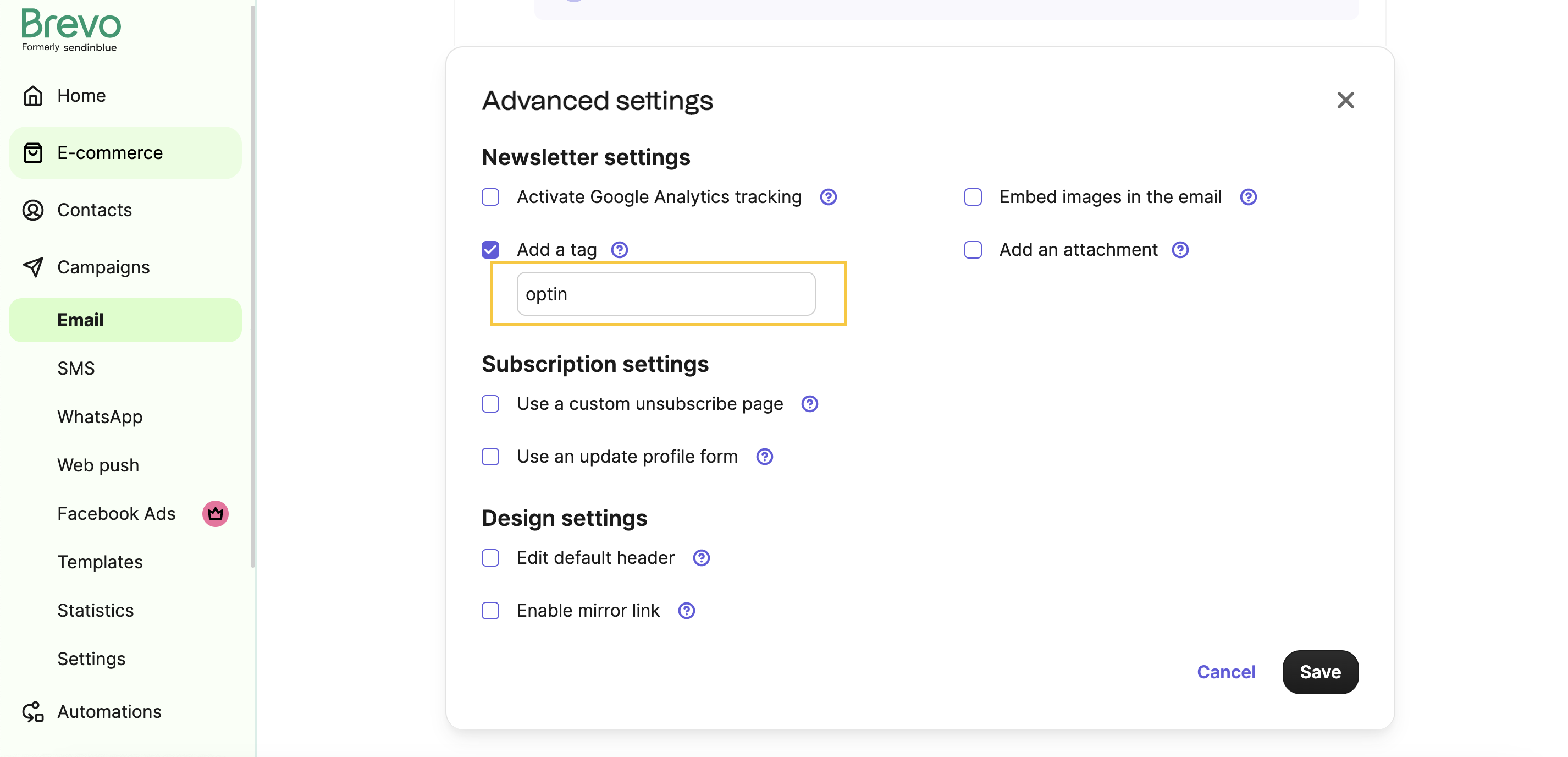
To create a custom DOI template, add an `optin` tag in the campaign template setup.
Specify which CTA in your template design triggers the confirmation by adding the `{{ doubleoptin }}` placeholder in your CTA link or button.
See the screenshot for setting up the optin tag:
## How to create a contact via DOI (Double-Opt-In) flow using the [API endpoint](/reference/create-contact)
The endpoint requires an active DOI template, otherwise it returns the following error:
```json
{ “code”: “invalid_parameter” , “message” : “An active DOI template does not exist” }
```
Note: Replace `{{ doubleoptin }}` with `{{ params.DOIurl }}` in your DOI template design to specify a custom redirection URL after your contact clicks the CTA. `DOIurl` is passed as an attribute in the API call and embedded in the `{{params.DOIurl}}` placeholder.
\
\
## Does API V3 support inline image (inlineImage) parameter for transactional emails as supported by API V2?
API V3 doesn't support it directly, but you can achieve the same result via `params` with the [Send a transactional email](/reference/send-transac-email) endpoint.
**Example: displaying a logo image in the email body.**
**Step 1.** Obtain the absolute URL of the logo image.
**Example url:** [https://img.mailinblue.com/2601503/images/rnb/original/5f8d7a79c93a8f36627df383.png](https://img.mailinblue.com/2601503/images/rnb/original/5f8d7a79c93a8f36627df383.png)
**Note**: If you're using Base64 encoding, host the image to get an absolute URL instead of using base64-encoded data of a local file.
**Step2.** Send the logo image URL as a `params` variable such as `LOGO_IMAGE_URL`.
```json
"params": {"LOGO_IMAGE_URL": "https://img.mailinblue.com/2601503/images/rnb/original/5f8d7a79c93a8f36627df383.png"}
```
**Step 3.** Reference the `LOGO_IMAGE_URL` attribute in `htmlContent`:
`{{ params.LOGO_IMAGE_URL}}`
**Example**
```json
"htmlContent": "Some content here

"
```
**Example curl command:**
```curl
curl --request POST \
--url https://api.brevo.com/v3/smtp/email \
--header 'Accept: application/json' \
--header 'Content-Type: application/json' \
--header 'api-key: YOUR API KEY' \
--data '{
"sender": {"name": "sender_name", "email": "sender_name@brevo.com"},
"to": [{"email": "to_name@brevo.com", "name": "to_name"}],
"htmlContent": "Some content here
",
"subject": "This is final signature logo",
"params": {
"LOGO_IMAGE_URL": "https://img.mailinblue.com/2601503/images/rnb/original/5f8d7a79c93a8f36627df383.png"
}
}'
```
The recipient email looks like:

## How many recipients can be added to a single transactional email?
A single transactional email supports **99** recipients in total across `to`, `cc`, and `bcc`.
##