

Action links
An action link is a UI component you add to a Brevo record: a menu entry or a card. Clicking it opens a URL you host, in a new tab, with the record’s details passed along as query parameters.
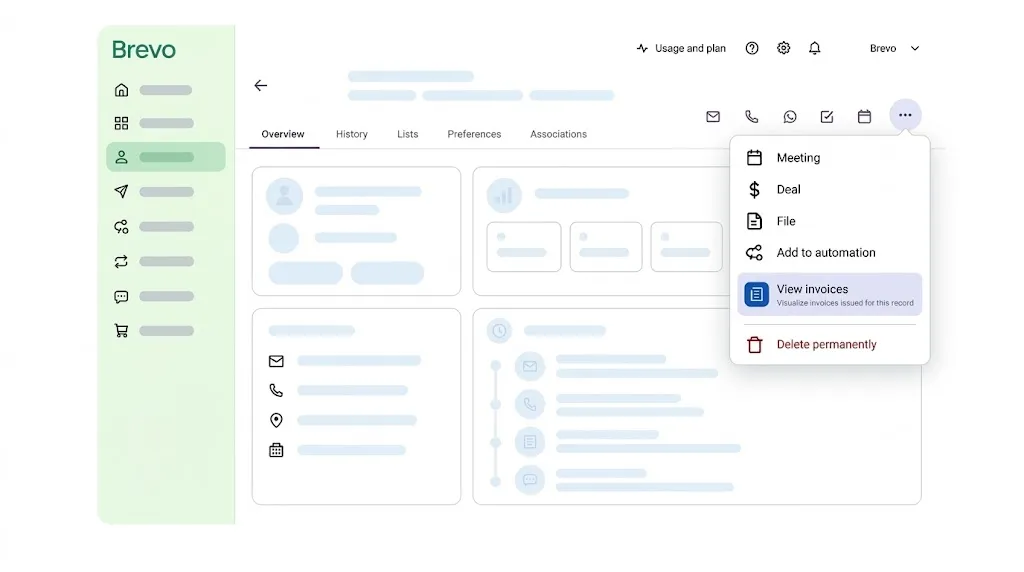
Under the hood, an action link is a UI app: an app-config.json with an empty auth: {} and a populated ui_app block, instead of the auth.scopes / auth.redirect_uris an OAuth app uses. The presence of ui_app is what makes it a UI app. There’s no OAuth callback and no local server to run.
Create one
UI apps can only be created interactively. The prompts walk you through:
- App name.
- Distribution type: choose Private. UI apps can’t be public for now.
- App type: choose UI app.
- Integration type: currently only Link is offered (iframe-based extensions aren’t ready in the guided flow yet).
- Record page: which Brevo record type the link appears on (e.g. Contact, Deal).
- Placement: where on that record page.
- Label: the menu entry’s text, or the card’s button (48 characters max).
- Supporting text (optional): a second line of description (255 characters max).
- Destination URL: the page the link opens.
This authors exactly one placement. To add more, edit app-config.json by hand and run brevo app upload.
app-config.json
brevo app create auto-seeds both context and size into app-config.json for you; edit the values by hand if you need something different.
Don’t set link_target yourself. Brevo stamps it during upload, and a value already in the file shows up as drift you can’t clear.
Receiving the record’s details
Brevo appends the record’s context to your URL as query parameters. The path itself is never templated:
These values arrive through the browser, so validate them like any other user input.
Push and install
See the CLI reference for the full flag list on brevo app upload and brevo app install:
Pass an account ID to either command to target a specific sub-account: brevo app install <account-id>. There’s no separate publish step. A successful upload changes what every account the app is installed in renders immediately, with no reinstall needed. Remove it with brevo app uninstall (same optional account ID).
A UI app has no local server to run. brevo app scaffold and brevo app start don’t apply here.
Adding more placements
brevo app create authors exactly one placement. To add another, append a surface_point_list entry with its own label and redirect_link, then run brevo app upload again. Slot names are validated by Brevo, not locally; an unregistered surface_point_name fails at upload.
On a Contact record, three placements are currently supported:
The same three placements exist for other record types: replace contactDetails with companyDetails or dealDetails.
Here’s ui_app.surface_point_list with two placements: a header menu item and a sidebar card: