

SMTP relay integration

Configure the SMTP relay to send transactional emails from your email client

Use the SMTP relay to send transactional emails from your email client or application. Send order confirmations, password resets, account creation notifications, and other automated messages.

SMTP credentials

Retrieve your SMTP username and password from SMTP and API settings. Under the “SMTP” tab, copy existing credentials or generate new ones.
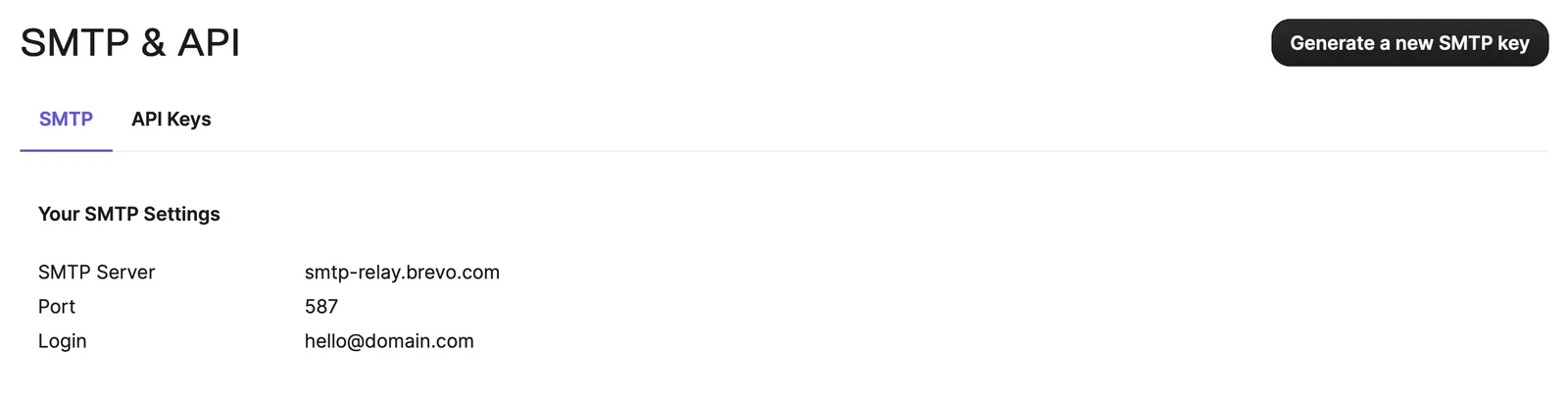
SMTP credentials settings

Use an SMTP key, not an API key, for SMTP relay connections.

Connection settings

Ports:

  • Non-encrypted: Use ports 587 or 2525
  • Encrypted: Use port 465 with SSL or TLS encryption

Encryption:

  • Leave empty unless using port 465, which requires SSL or TLS encryption

SMTP parameters

The following parameters are available for SMTP relay messages:

ParameterTypeDescriptionExample
senderObjectSender information. Required if templateId is not provided. Pass name (optional) and email, or id. If id is provided, name is ignored.{"name":"Support", "email":"no-reply@brevo.com"} or {"id":2}
toArray of objectsRecipient email addresses and names (optional). Required if messageVersions is not provided. Ignored if messageVersions is provided.[{"name":"John", "email":"john@example.com"}]
bccArray of objectsBCC recipient email addresses and names (optional).[{"name":"Admin", "email":"admin@example.com"}]
ccArray of objectsCC recipient email addresses and names (optional).[{"name":"Manager", "email":"manager@example.com"}]
htmlContentStringHTML body of the message. Required if templateId is not provided. Ignored if templateId is provided.<!DOCTYPE html><html><body><p>Content</p></body></html>
textContentStringPlain text body of the message. Ignored if templateId is provided."Plain text content"
subjectStringEmail subject line. Required if templateId is not provided."Your order confirmation"
replyToObjectReply-to email address (required) and name (optional).{"email":"support@brevo.com", "name":"Support Team"}
attachmentArray of objectsAttachments. Provide absolute URL (no local files) or base64-encoded content with attachment name. Name is required if content is provided.See attachment object attributes below
headersObjectCustom headers (non-standard) to include in the email.{"X-Custom-Header":"value"}
templateIdInt64Template ID to use for the email.2
paramsObjectTemplate variables for customization. Only applies to templates using New Template Language format.{"FNAME":"John", "LNAME":"Doe"}
messageVersionsArray of objectsMultiple message versions with personalized content. See API reference for details.Contains multiple versions with same sender and recipient parameters
tagsArray of stringsTags to categorize and filter emails.["order", "confirmation"]
scheduledAtdate-timeUTC date-time for scheduled delivery (YYYY-MM-DDTHH:mm:ss.SSSZ). Include timezone. Expected delay of up to 5 minutes. Currently in public beta.2022-04-05T12:30:00+02:00
batchIdStringUUIDv4 batch identifier for scheduled batch transactional emails. Auto-generated if not provided.5c6cfa04-eed9-42c2-8b5c-6d470d978e9d

Sender object

AttributeTypeDescriptionExample
nameStringSender display name. Maximum 70 characters. Only applicable when email is provided."Support Team"
emailStringSender email address. Required if id is not provided."no-reply@brevo.com"
idInt64Sender ID. Use to select a sender with a specific IP pool. Required if email is not provided.2

Recipient objects (to, bcc, cc)

AttributeTypeDescriptionExample
emailStringRecipient email address."user@example.com"
nameStringRecipient display name. Maximum 70 characters."John Doe"

Reply-to object

AttributeTypeDescriptionExample
emailStringReply-to email address."support@brevo.com"
nameStringReply-to display name. Maximum 70 characters."Support Team"

Attachment object

AttributeTypeDescriptionExample
urlURLAbsolute URL of the attachment. Local files are not supported."https://example.com/attachment.pdf"
contentStringBase64-encoded attachment content."b3JkZXIucGRm"
nameStringAttachment filename. Required if content is provided."invoice.pdf"

Headers object

Custom headers are key-value pairs. The key is the header name, and the value is the header value. Only non-standard headers are supported.

The SMTP relay does not support batch sending. Use the batch sending API endpoints for batch operations. The SMTP relay is designed for transactional emails.

To improve deliverability for B2B emails, consult Brevo IP ranges from the help center.